
Microsoft Control Validation
Accelerynt Security Platform
If you run Microsoft 365, this is built for you. See which policy took precedence, why Conditional Access blocked someone, and how to fix it. One view of the tenant, not one account at a time.


Identify
See exactly where you are exposed. Fix it before someone exploits it.
The policy on the inside. What is exposed on the outside. Both sides in one view.
Prioritized Risk Reports
Findings name the specific account, policy, or role.
Ranked findings tell you what is exposed. You also see which policy is in the way, so you are not digging through logs and views to find the root cause.

Dashboard
Posture across your tenants, in one view.
Aggregated scores across Identity, Email, SharePoint, Teams, Defender XDR, Power Platform, Azure DevOps, GitHub, AWS, and GCP. Sort by worst first. Click any score to see the findings behind it and get a report leadership can see, not just the dashboard. If you manage tenants for customers or for a family of companies, they all show up in one console, each with its own evidence.

CI/CD Findings
Your deployment pipeline, validated.
GitHub and Azure DevOps scans cover agent pool access, service connections, branch protection, and workflow secrets. Findings link to their remediation steps.

Exposure Correlation
What is visible outside, connected to what is true inside.
The platform scans your external surface across your domains. When it finds something exposed, it connects that finding to the settings of the tenant behind it. You see both sides of the same exposure in one view.

Accelerynt Security Platform Control Validation
Identity
Conditional Access Policies
Coverage gaps, exclusions, and which policies take precedence.
Identity Controls
MFA enforcement, legacy auth, sign-in risk, account protection.
Privileged Identity
Standing admin rights, PIM coverage, break-glass posture.
Non-Human Identities
Authenticating agents, API connections, and agentic workflows.
Collaboration & Data
Teams & Collaboration
External sharing, guest access, meeting policy, sensitivity labels.
Data Loss Prevention
DLP policy coverage, exceptions, enforcement across workloads.
Exchange Online
Mail flow rules, anti-phishing, impersonation protection, safe links.
Device & Apps
Intune Management
Compliance policies, configuration profiles, enrollment posture.
SharePoint & OneDrive
Sharing boundaries, anonymous links, sync restrictions, retention.
App Registrations
Consent grants, risky permissions, abandoned app identities.
Code & Pipeline
GitHub
Repository permissions, workflow secrets, branch protection, action configurations.
Azure DevOps
Agent pool access, service connections, pipeline policies, deployment controls.
External Attack Surface
DNS & Domains
DMARC, SPF, DKIM, subdomain takeover risks, certificate validation, TLS fingerprinting, cloud storage exposure, and CDN detection across the domains you own.
Asset Timeline
When and where assets are deployed to and removed from the edge. Historic inventory across your external surface.
Shadow Tenants
Entra tenants found on your own domains that nobody is managing.
AI Surface
Copilot & AI
Oversharing, who has access, and license usage. What data Copilot and agents can reach.
A configuration risk can look minor on its own. Connected into an attack chain, it becomes critical. You see the path and what to fix first.
Remediate
See what an attacker would find. Fix it before they exploit it.
Critical findings are hard to see across a complex environment. They come ranked by risk, with how to fix them, not only the score.
Attack Chains
How configuration risks connect.
Your scan findings map to MITRE ATT&CK attack chains specific to your environment. Internal paths cover Microsoft 365, Entra, Azure, AWS, and GCP, and hybrid chains connect your external exposure to internal access. Supply-chain paths trace through your CI/CD pipelines, and partner compromise scenarios map across shared administrative boundaries. You see how an attacker would move from one finding to the next, and which path to address first.

ATT&CK Coverage
Your technique coverage, measured against MITRE ATT&CK.
The platform maps your scan findings to MITRE ATT&CK techniques and shows catalog coverage as a percentage. You see which techniques your controls address, which remain exposed, and how active attack chains connect across them.

Prioritized Remediation
Fix what matters, in the right order.
Chain Breaker™ ranks your fixes by impact. The What-If Simulator™ lets you remove any finding and see which attack chains break before you make the change. When a finding involves a known vulnerability, you also see whether attackers are actively using it, so those fixes rise to the top of your list.

Interim Detection
While you fix the gap, we watch it.
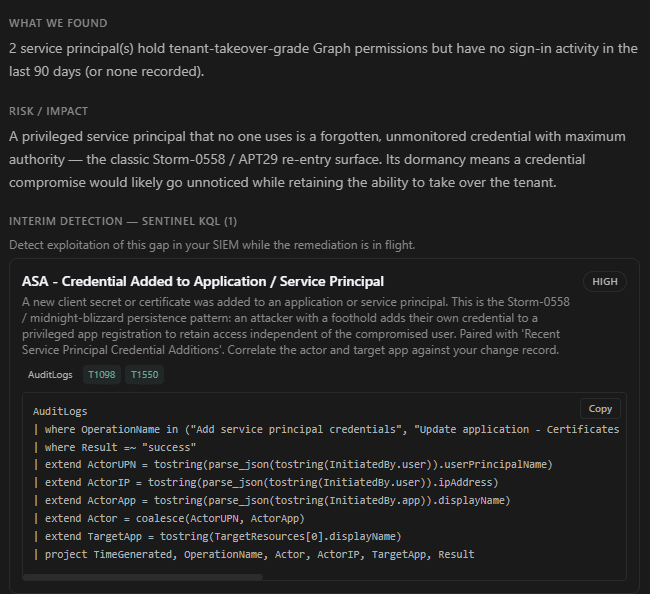
Posture findings include compensating detection rules you deploy into your Sentinel workspace with a single copy and paste. Detection rules are mapped to the threat that finding enables, so if someone exploits the gap before the fix is in place, the rule fires.
Remediation Guidance
The fix, step by step.
Findings come with remediation guidance your team can follow without guessing, so you are not on a scavenger hunt through menus to learn why a test failed. Some fixes are scripts you review and run. Others are step-by-step walkthroughs with actions documented and linked to relevant Microsoft Learn articles. Templates account for dependencies across your environment, so a fix in one area does not create a new exposure in another.

Findings can be routed into Splunk, ServiceNow, Jira, PagerDuty, and Slack through prebuilt webhook integrations and a public API.
Validate
See what has changed before someone asks. Have a report leadership can use.
When leadership asks what changed, you are not building it from screenshots and notepad. The evidence is already there.
Configuration Drift
Know what changed, don’t find out after.
You see changes with before and after values, when they happened, and the account responsible. Workflow status tracks events from detection through remediation.

Risk Register
Open risks, with dates.
One register holds findings across your environment with their history: first discovered, last seen, current status, and whether they came back after a fix. When someone asks how long a risk has been open or what was resolved this quarter, the answer is already on the page.

Compliance and Audit Evidence
Audit evidence, automated.
Findings map simultaneously to NIST CSF 2.0, NIST 800-53, MITRE ATT&CK, CIS Microsoft 365, CISA SCuBA, Microsoft MCSB, HIPAA, PCI-DSS v4.0, ISO 27001:2022, CIS DevOps Foundations, CIS GitHub Foundations, CIS Azure Foundations, CIS AWS Foundations, CIS GCP Foundations, and CIS Google Workspace Foundations.
An auditable evidence trail generated directly from your own environment.

Visibility starts the day your team signs in.
Deployment
Getting Started with
Proactive Microsoft Security.
Your team signs in through your existing identity provider using SAML or OIDC. SCIM provisioning keeps each person’s access scoped to their role as people join, change roles, or leave. Your first tenant typically connects in under ten minutes with no agents deployed.
1
Scan in minutes
Visibility across your Microsoft environment in minutes. Connect once, hit scan, review findings in one place.
2
See your top risks
You know exactly where to focus. Findings name the specific account, policy, or role, ranked by what matters most.
3
See the attacker’s path
Fix what reduces the most risk first. You see how individual findings connect into the paths an attacker would follow.
4
See what changed
Audit-ready evidence before anyone asks. Changes go on the record with who made them and when, and that record can be checked by someone outside your company.
Security validation made easy.
Evidence on demand. Produced from your live environment.
FAQ
Frequently Asked Questions
Read-only permissions scoped to the specific Microsoft services being validated. Nothing is written to your tenant. No agents are deployed to endpoints. Connection typically takes under ten minutes, and the permission set is documented and available for your security team to review before connection.
Your data lives on dedicated Azure infrastructure: dedicated App Service, dedicated PostgreSQL database, dedicated Key Vault. No shared data store. No other customer can access your findings, drift history, or external attack surface data. Accelerynt manages the infrastructure, and our operational access is time limited, audit logged, and transparent.
No. The Accelerynt Security Platform operates on read-only permissions. It does not modify configurations, roll back settings, or execute scripts in your tenant. Remediation guidance is documented with step-by-step instructions your team reviews and applies on their own terms. Tools that automate changes require write access, and that access stays open whether or not your team is reviewing each action. Read-only architecture closes that door.
Secure Score measures every tenant against the same set of Microsoft recommendations. The Accelerynt Security Platform measures your tenant against the baseline your team approved and tracks where current settings diverge from it. It uses Microsoft’s scoring as one of its inputs and checks more than Secure Score does, with findings mapped to CISA SCuBA and 14 other frameworks, one view across every tenant you manage, outside exposure connected to inside settings, and evidence produced independently of the systems it evaluates.
Yes. Tenants you manage show up in one console, with findings and evidence kept separate by tenant. Service providers see their whole customer list in one view and can pull proof for any customer when asked. Companies that ended up with several tenants through growth or acquisition get the same single view, including tenants split between government and commercial clouds.
The platform includes a public API and prebuilt webhook integrations for Splunk, ServiceNow, Jira, PagerDuty, and Slack. Findings, drift alerts, compliance events, and remediation status route directly into those tools. Custom integrations use signed webhooks for secure, verified delivery.